Performance and Resource challenge

We need help figuring out how to improve performance on our app.

Below is the server spec:

2 Premium Intel CPUs
4 GB RAM
35 GB Storage
App version 4.15.0

all hosted on DigitalOcean (Docker)

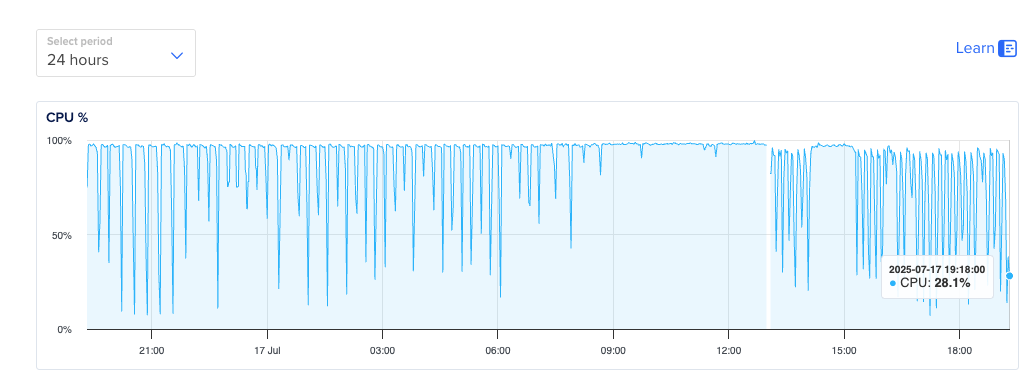
As seen in the images below, the memory and storage seem to be at good levels, but the CPU is maxed out most of the time. Is it possible that any of the engineers have experienced this behavior before, and what can we do aside from upgrading the app version?


We have implemented purging, but that has not helped with this; neither has increasing CPUs to 4.
We have now upgraded 8GB RAM, 4 Intel CPUs. While this improved the performance for a couple of weeks, we are beginning to see the spikes, with replication again several minutes, and some times hours.

The big concern is that this is only deployed in 3 Local Governments areas with only 120 users. There are ongoing talks on scaling state wide in multiple states. With the current resources we have deployed, It doesn’t look cost effective to scale.


This is the stats for the last 7 days.

Hi @femi_oni

I’m sorry you are experiencing performance issues.
I’m afraid that your initial setup, with 2 CPUs is absolutely not sufficient for CHT to run at any capacity (maybe I would assign this machine for a small test server that I have no purpose of loading). The new setup, with 4 CPUs is a bit better, but still on the very low resource side. With very low resources, higher latency is normal.

Enabling purging is good, but that is a solution for removing load from client devices, and not on the server (purging actually creates more load on the server).

The graph that you showed with the spikes is not looking concerning. it could be purging causing those spikes for example (I would EXPECT purging to cause CPU spikes).

The argument for the number of users is not necessarily relevant. You could have only ONE user logging in who has many docs and on a small server, and this user replicating can take significant time, or can fail altogether.

So I’m curious about: how many documents you have on the server? How many documents each user is trying to replicate and how long it takes to replicate, depending on the number of docs the user has.

We currently have 492050 docs at 0.5 GB. The most affected users at the Local Government HF level will have between 10,000 - 15,000 records loaded on their local DB. Replications take a few minutes to half an hour. This is a big problem when they have clients waiting.

There are ongoing talks on scaling state wide in multiple states. With the current resources we have deployed, It doesn’t look cost effective to scale.

Is there more information you’re able to share? Looking at DigitalOcean pricing, going from 2CPU/4GB → 4CPU/8GB cost ~2x in monthly fees. For this, your CPU went from 100% utilized to ~20% utilized, which represents a 5x increase in capacity.

Given all this, can you share more about why the price to add more RAM and CPU doesn’t look cost effective to scale?

While we’re on the topic of scaling, note that we’ve found CHT prefers a closer mapping of 1 shard : 1 CPU. As we ship with 12 shards by default, all deployments will continue to see dramatic improvements up to 12 CPUs. Likely even going past 12 will help to accommodate for non-couch related tasks.

To be clear though: your deployment has ~20% utilization so does not seem to need more than 4 CPU, even though it is on the low side as Diana said.

One final thought on the server performance is that CHT 4.21 has Couch 3.5 which has been shown to have dramatic improvements, especially as deployments get larger. We recommend upgrading to take advantage of these improvements.

The most affected users at the Local Government HF level will have between 10,000 - 15,000 records loaded on their local DB. Replications take a few minutes to half an hour. This is a big problem when they have clients waiting.

Please note we don’t recommend users have more the 10k documents per user - we’ve found performance can be negatively affected on both client and server.

Can you confirm if the clients have good connectivity when they take 30 minutes to sync? Do they have modern specs in terms of RAM and CPU?

A good way to test this would be:

  • find as many offline users as you know of that experience slow sync
  • find the fastest laptop with the best WiFi/Ethernet you have access to
  • time how long it takes to log in with these affected offline users on the laptop

If the login is very fast, you know the slow sync is caused by connectivity or possibly CPU/RAM on the mobile handsets. If the laptop is slow like the handsets, it is very likely the server.

Some additional resources which might help here are:
1 Like

The issue is that whenever there is such spikes, which usually happens in the hours they have the most clients, the performance degrades significantly.
As I typed this reply, I received this message directly from the field.

I was currently in the facility taking fixed session but the Application kept loading for more than 20 minutes, since I sent one feedback I was not able to send feedback or enrol any.
Please I need support because I refreshed more than 5 time but still loading.
Thank you

I understand that there are recommended specifications, but I also understand that these are related to how much work is being done. We have test instances running on the barest minimum specs that are running just fine. So please understand our concerns that a spec of 4 CPUs with 8 GB RAM is struggling to process ~500k docs at 0.5GB.
This is a public project with sustainability baked into every page, with plans to hand over to the government agencies soon. We just need to be able to articulate that it will remain sustainable during the discussions for scaling the project.

I can request a spec bump, but that will cost ~$5k/yr(on DigitalOcean for 16 CPUs, no 12 CPU options) for 120 users. I am struggling to justify that, especially, again, having scale-up at the back of my mind. Will the cost for 1200 users still be deemed sustainable?

I posted this to see if we, the tech team, can do something to optimise the processes and improve the experience.
We will fine-tune purging further to, as much as possible, reduce the size of local DBs to less than 10k. Are there other aspects we can look at to remedy the situation along with increasing the number of CPUs?

Thanks very much for the additional details @femi_oni . I really appreciate knowing the realities of your struggles - the on the ground challenges are always a more complication than hypothetical planning. I can see that there are CPU spikes well above 50% despite the average being about 20%.

I agree that $5k/yr for 120 users sounds too expensive, especially when you consider scaling, assuming linear cost increase, would mean $50k for 1200 users. Let’s dig into this to see what we can discover!

Can you confirm which Digital Ocean droplet you have: Basic, CPU, General, Memory or Storage optimized? Also, you mentioned you started with 2 CPU/4GB and are now on 4 CPU/8GB. I think the next logical upgrade would be to 8 CPU/16 GB and not 16 CPU/32GB?

I was currently in the facility taking fixed session but the Application kept loading for more than 20 minutes, since I sent one feedback I was not able to send feedback or enrol any.

Is this user offline? If yes, I would hope that if they keep their device offline while in the facility, all forms being completed should be near instant and not at all constrained by slow sync times. Later, when after visiting the facility when there’s plenty of time, they should the be able to get online and not be impacted by slow sync times.

I’d also like to loop in some teammates who might have more insights into where we can look next to improve performance. Calling out to @twier @diana and @hareet : Ideas where we can look next to reduce CPU load and reduce time to sync?

Hi @femi_oni, I am following up to check if the server was upgraded and whether the performance has improved.

Femi - while you’re taking a moment to respond to Antony - it would be great to hear an update on which exactly which droplet you’re on. Thanks!

1 Like

Hi @mrjones

We updated to CHT 4.21 and have seen some improvements. We still have the spikes, but the far in between and now and last for shorter periods, as you can see in the charts I attached. I am also trying to convince the team to tighten the purging rules to keep local docs under 15k.

While there is general relief for now, there are still many questions about the cost of scaling statewide, with easily 10 times the current users.

1 Like

Thanks for the update @femi_oni !

I see you’re running on a 4CPU/8GB Basic Droplet which is $48/mo. I would suggest trying out going to the 8CPU/16GB Basic Droplet which is $96/mo, or $1.2k/year, a fifth of the yearly cost we were originally concerned about. I think you’ll see when there’s spare CPU cycles, everything will go more quickly. There will always compute headroom for a burst of activity. Should the upgrade not work out, you can always scale the droplet back down to reduce costs. Be sure to only scale the RAM and CPU though, as scaling the disk will prevent you from downgrading. Further, they charge by the hour, so you’ll only be billed for the exact time you upgrade the droplet.

It would be great to do the droplet upgrade on a Friday and then see what the following week of activity looks like.

While we’re on the topic of monitoring, do you have Watchdog set up? If yes, I recommend setting up Node Exporter and cAdvisor as well.